
One place to run your firm
and every client engagement.
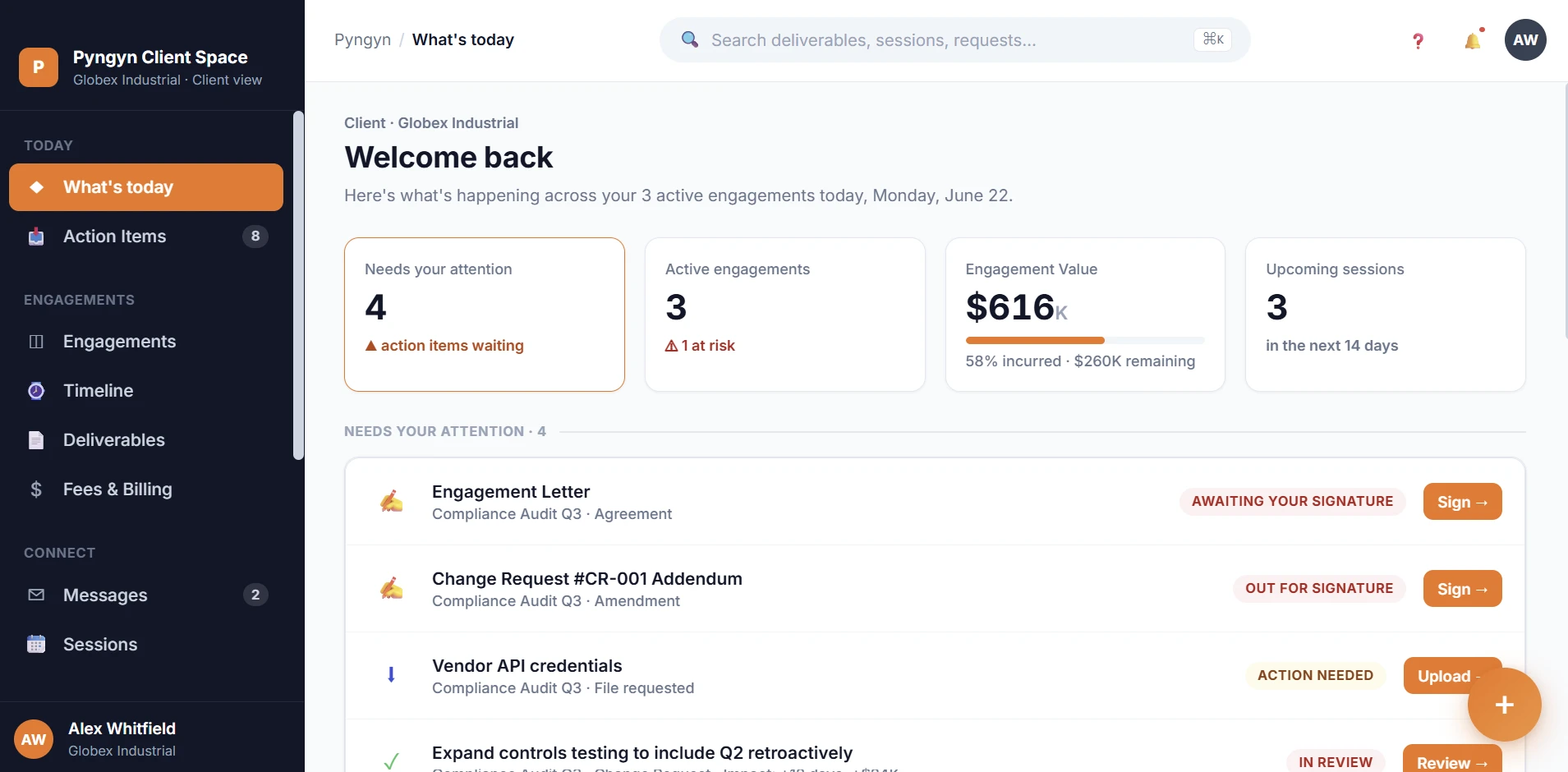
PYNGYN gives every client a branded portal where they see their status, documents, and approvals 24/7, instead of emailing you for updates. It's a standalone product, no Workspace required, though firms that also want to run projects and billable time internally can add Workspace or bundle both.
Trusted by 500+ professional-services firms
30-min walkthrough · On your firm's workflows · No commitment
Engagement letter
Compliance Audit Q3 · Agreement
Change Request #CR-001
Compliance Audit Q3 · Addendum
Vendor API credentials
Compliance Audit Q3 · File requested
Expand controls testing
Include Q2 retroactively
PYNGYN flagged 1 item at risk: the signature is 2 days overdue and the next client session is Friday.
Our partners




Built for professional-services and consulting firms
Your clients are in the dark.
Most firms still run client communication through email. Clients can't see anything without asking, so you become the bottleneck between them and their own information.
Clients in the dark
Clients can't see anything without asking, so they ask constantly. “Any update?” “Did you get my email?”, and the work stops while you answer.
Clients feel forgotten
Firms rarely lose clients over the work. They lose them because clients feel ignored between conversations, never sure what's happening or what comes next.
Email everywhere
Documents, approvals, and decisions are scattered across inboxes and WhatsApp, unsecured, untraceable, and impossible to find when you need them.
Decision fog
A scope change agreed six months ago affects today's delivery. Nobody remembers what was decided, why, or who approved it.
Budget blindness
A partner does not know if a project is profitable until the invoice goes out. By then the overrun has already happened.
Knowledge walks out
A senior leaves and takes five years of client context with them. Nobody wrote it down. The next engagement starts from zero.
A branded portal for every client.
Clientspace is what your clients log into: a complete, standalone product that replaces the email threads and status calls that eat your week.
Clientspace
A branded, secure portal for every client. They see their status, documents, approvals, and invoices 24/7, so they stop emailing you for updates and start self-serving, while you stay fully in control of what they see.
- Branded as your firm, one space per client
- Live status, documents, and approvals
- One-click access, no password for clients
- Clients see only their own engagement
Also want to run projects and billable time internally? Workspace is available as an add-on.
Three reasons firms switch.
Clients stop chasing you
Every client gets a branded portal where they see status, documents, and approvals 24/7, so the “any update?” emails stop and you stop being the bottleneck.
You look buttoned-up
A white-labeled portal in your firm's name makes every client feel informed and in control. Clients leave firms that ignore them; this keeps them close.
Nothing runs on email
Documents, approvals, and messages live in one secure place per client (encrypted, audit-trailed, and isolated), instead of scattered across unsecured inboxes.
A client portal live in minutes.
Create the Clientspace
Spin up a branded portal for a client in a couple of clicks, your logo, your colors, your domain.
Invite the client
Send a magic link. They click once and they're in, no password, no setup on their end.
They self-serve, 24/7
Status, documents, approvals, and invoices are all there. The “any update?” emails stop, and your team keeps the picture current from Workspace.
Built for every professional-services firm
However your firm works, PYNGYN runs the engagement and keeps it on track.
Run every matter
from intake to filing
Manage matters, deadlines, and client communication in one place, with PYNGYN tracking every filing date and deliverable.
- Track matters and court deadlines
- Keep client documents and approvals in order
- Flag filings at risk before the deadline
The actual product. Not a mockup.
Real screens from Clientspace and Workspace, the two products your firm and clients use every day.
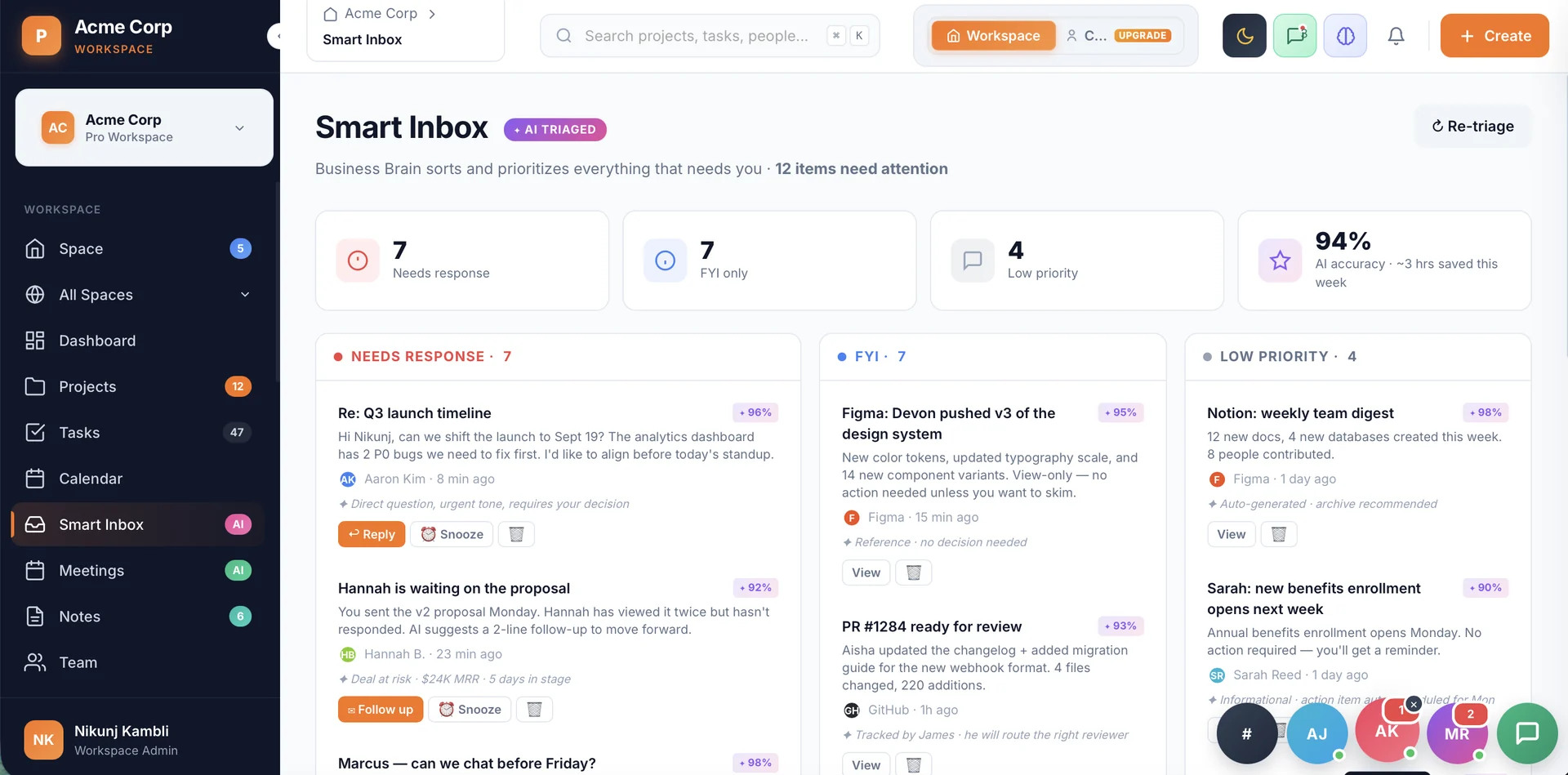
AI triages everything that needs you.
Smart Inbox sorts client replies, approvals, and updates into Needs response, FYI, and Low priority, each with a one-line reason, so partners spend their time deciding, not sifting through a feed.
Before / after
Why client work falls through the cracks.
More clients, more stakeholders, more tools bolted together over time. Drag the slider to see what changes when it all runs through one system instead.
Engagement letter
Compliance Audit Q3 · Agreement
Change Request #CR-001
Compliance Audit Q3 · Addendum
Vendor API credentials
Compliance Audit Q3 · File requested
Expand controls testing
Include Q2 retroactively
PYNGYN flagged 1 item at risk: the signature is 2 days overdue and the next client session is Friday.
Proposal_final_v3.pdf
"did we sign this yet?"
Pricing_ACME_v7.xlsx
Re: Re: Re: status update
call recording link
Engagement_tracker_FINAL2.xlsx
Old way
- Status scattered across WhatsApp, email, and spreadsheets — nobody has the full picture before a client call.
- SOPs and client context live in one partner's head. When they're out, work slows down.
- Deadlines slip silently — risk is invisible until it's already cost you the date.
- Scope creeps between formal change orders. The firm quietly absorbs the cost.
- Several people are "on" a task, but nobody really owns it.
- You learn a project was unprofitable after the invoice goes out.
New way
- One branded Clientspace per engagement — client and team see the same live status.
- A living knowledge base surfaces SOPs and client history exactly when they matter.
- AI risk detection flags what threatens dates and margin, days earlier.
- Change requests and approvals are tracked in the open, not absorbed in silence.
- Every task has a clear, visible owner from the moment it's created.
- Live engagement health, so margin problems surface weeks before the invoice.
Hear it from the teams using it.
A real customer, in their own words, on what changed once the busywork moved to PYNGYN.
Made for how services firms run.
How professional-services and consulting firms put Clientspace and Workspace to work. Roles only, no names.
“We finally see whether an engagement is profitable while it's running, not after the invoice. We price and staff client work completely differently now.”
“Clients open their own Clientspace and see exactly where things stand without emailing us. Our partner review stopped being a status-chasing meeting.”
“Internal work and client work finally live in one place. When a senior leaves, five years of client context doesn't walk out the door with them.”
Illustrative figures from our free ROI calculator using default assumptions, not customer averages. Model your own firm.
Why teams leave their old tracker.
| Capability | Old trackerTraditional tracker | PYNGYN |
|---|---|---|
| Build the plan | You enter every task by hand | AI drafts it from your goal |
| Keep status current | Manual updates & chasing | Generated automatically |
| Spot risk | You notice when it's late | Flagged before it slips |
| Time to value | Hours of setup | Minutes |
Plugs into the tools you already use.
PYNGYN sits at the center of your workflow. Connect your chat, email, code, and docs once, and plans, status, and updates flow where your team already works.
- Connect once, no per-project setup or re-auth
- Works with chat, email, calendar, code, and docs
- Status and updates flow to where your team already is

Enterprise-grade, by default.
Your data is encrypted, never sold, and never used to train models without your consent.
Pricing that scales with your team.
Flexible, transparent pricing built for teams of all sizes.
Client Space
Most popularA branded portal for every client, status, documents, and approvals in one place. No Workspace required.
- Branded, white-labeled client portal
- One isolated space per client engagement
- Shareable, one-click client invite links
- Clients see only their own engagement
- Client-visible tasks, deliverables, and status
- Approvals and sign-off
- Secure document sharing
- Role-based access for the client role
Workspace
The additional product for your firm: run projects, finances, and billable time in one place.
- Projects, tasks, and calendar
- Goals and OKRs
- Request forms and documents
- Finance dashboard: revenue, MRR, profit
- Billable vs non-billable timesheets
- Export to CSV for invoicing
- Business Brain: context-aware AI on your firm's knowledge
- Smart Inbox and AI meeting agendas
- Plain-English automation builder
- Skills, benchmarks, and skill-gap insights
- 240+ workflow templates
- Roles: directors, managers, and ICs
Combined Bundle
Best valueRun your firm and your client portals on one bill, at a bundled rate lower than buying separately.
- All of Workspace
- All of Client Space
- Save $3+ per month vs. buying separately
- One bill, one login for your firm
Enterprise
For larger firms that need scale, security, and customization.
- SSO / SAML and role-based access control
- Audit log and data residency options
- Custom fields, API, and webhooks
- Dedicated onboarding and support
Questions, answered.
A 30-minute guided walkthrough where we run PYNGYN on a project like yours, with no generic slideshow.
Stop managing the tool. Start shipping the work.
See PYNGYN run a real project in 30 minutes, and let AI handle the project management busywork.
30-minute walkthrough · Tailored to your team · No commitment